A focused workspace for peer-review

ReviewerOne

Version 1.024

Open a manuscript PDF, create numbered comments from highlighted text, and copy or export the finished review.
Download ReviewerOneSingle HTML file · No installation requiredVersion 1.024
Open a PDFSelect a PDF manuscript stored on your computer. Add an optional due date.
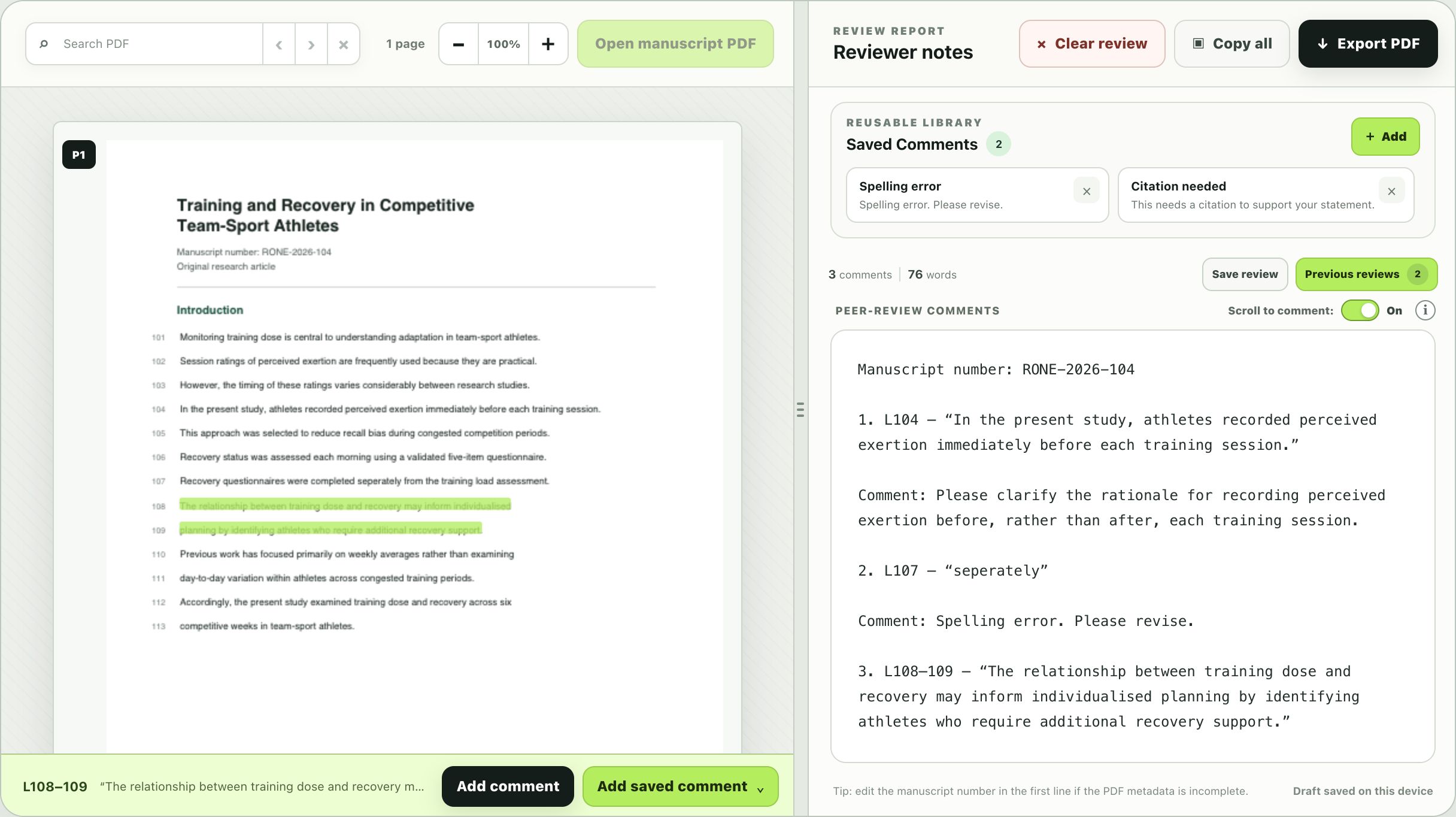
Select a passageHighlight PDF text, then right-click or select add comment/saved comment to add a numbered comment. The PDF page/line numbers are auto detected and inserted into your comment.
Scroll to commentClick anywhere inside a page/line number in your review to scroll to that text in the PDF.
View saved reviewsView an earlier review via a slide-over panel. This is useful for checking how your previous comments have been addressed in a revised manuscript.
Finish the reviewEdit your comments, compare to previous reviews, then copy or export them as a PDF.
Save reviewSave your review for later, such as when comparing a revised manuscript to your earlier review.
ReviewerOne app interface — a highlighted multi-line passage becomes a line-range comment.
The complete ReviewerOne interface showing a passage highlighted across lines 108 and 109 and its corresponding third review comment